BBC Microbit



BBC micro:bit
Bluetooth Mouse & Keyboard
Introduction
The built-in bluetooth does not currently work with MicroPython. There are some bluetooth breakout boards that can be used for this though. This project uses Adafruit's Bluefruit EZ-Key HID breakout to send keyboard and mouse commands over bluetooth. You will need a bluetooth enabled PC or bluetooth dongle to test this.
This isn't a cheap component. It costs £15-20. It has a lot of features, is easy to communicate with and tolerates a range of different voltages for input. It also works without a micro-controller with built-in, reprogrammable input pins. I had one of these already and wanted to see if I could get the UART functions of the micro:bit working.
Circuit
Not much to connect here.
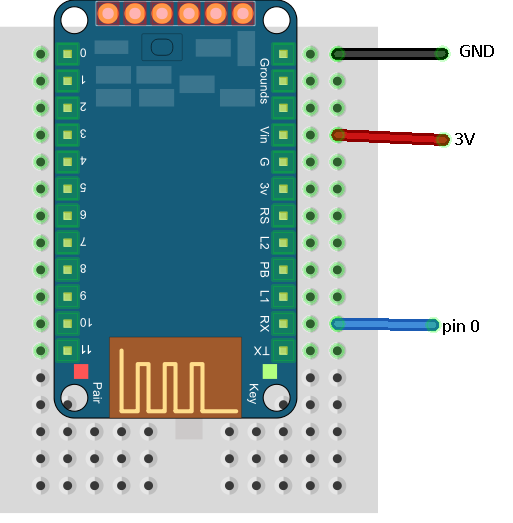
Plug in your micro:bit now. Press the button on the Bluefruit and pair it with your computer.
Programming - Keyboard
You can send strings of characters and they will get sent to the computer as keyboard input.
from microbit import *

uart.init(baudrate=9600, bits=8, parity=None, stop=1,tx=pin0)

while True:
    b=0
    dx = 0
    dy = 0
    if button_a.was_pressed():
        uart.write('Button A was pressed')
    elif button_b.was_pressed():
        uart.write('Button B was pressed')
    sleep(50)
There are non-printing characters. This program sends backspace and enter key presses to the PC when the A and B buttons are pressed.
from microbit import *

uart.init(baudrate=9600, bits=8, parity=None, stop=1, tx=pin0)

while True:
    if button_a.was_pressed():
        uart.write(bytes([0x08]))
    elif button_b.was_pressed():
        uart.write(bytes([0x0d]))
    sleep(50)
Here is a table of the other characters that you can send.
| HEX | Keyname |
|---|---|
| 0x01 | Insert |
| 0x02 | Home |
| 0x03 | Page Up |
| 0x04 | Delete |
| 0x05 | End |
| 0x06 | Page Down |
| 0x07 | Right Arrow |
| 0x08 | Backspace |
| 0x09 | Tab |
| 0x0A | Enter |
| 0x0B | Left Arrow |
| 0x0C | Down Arrow |
| 0x0D | Enter |
| 0x0E | Up Arrow |
| 0x0F - 0x1A | F1 - F12 |
| 0x1B | Esc |
| 0x1C | Caps Lock |
| 0x1D | Scroll Lock |
| 0x1E | Break |
| 0x1F | Num Lock |
| 0x20-0x7E | Printable Ascii |
| 0x7F | Toggle iOS Keyboard |
| 0xE0 | Left Control |
| 0xE1 | Left Shift |
| 0xE2 | Left Alt |
| 0xE3 | Left GUI |
| 0xE4 | Right Control |
| 0xE5 | Right Shift |
| 0xE6 | Right Alt |
| 0xE7 | Right GUI |
Programming - Mouse
This isn't so easy to get right with the accelerometer - an analogue joystick works a lot better for this. It shows you how to send mouse commands though,
from microbit import *

def MouseCommand(buttons, mousex, mousey):
    d = bytes([
    0xFD,0x00,0x03,
    buttons,mousex,mousey,
    0x00,0x00,0x00
    ])
    uart.write(d)
    return

    uart.init(baudrate=9600, bits=8, parity=None, stop=1, tx=pin0)

while True:
    b=0
    dx = 0
    dy = 0
    if button_a.was_pressed():
        b = 0x01
    elif button_b.was_pressed():
        b = 0x02
    if abs(accelerometer.get_x())>200:
        dx = accelerometer.get_x() // 40
    if abs(accelerometer.get_y())>200:
        dy = accelerometer.get_y() // 40
    MouseCommand(b,dx,dy)
    sleep(10)
Challenges
- Make a touch controller for a game. You have 3 touch pins, enough for left-right-fire or left-right-jump.
- You can send the keyboard signals when you like. Sending random text to a sibling's PC at random intervals is quite possible.
- You can use this with phones too. Pehaps you might make a remote control. Search for Adafruit's guide to the product and you'll be able to work out how to send the multimedia commands.